
What an export looks like
When you tap Export in the app, Sojourn produces a PDF (and a CSV companion) that captures every entry and exit in the period, your identity, the rule applied, the domicile factors you've recorded, and a SHA-256 checksum that proves the file hasn't been silently edited afterwards.
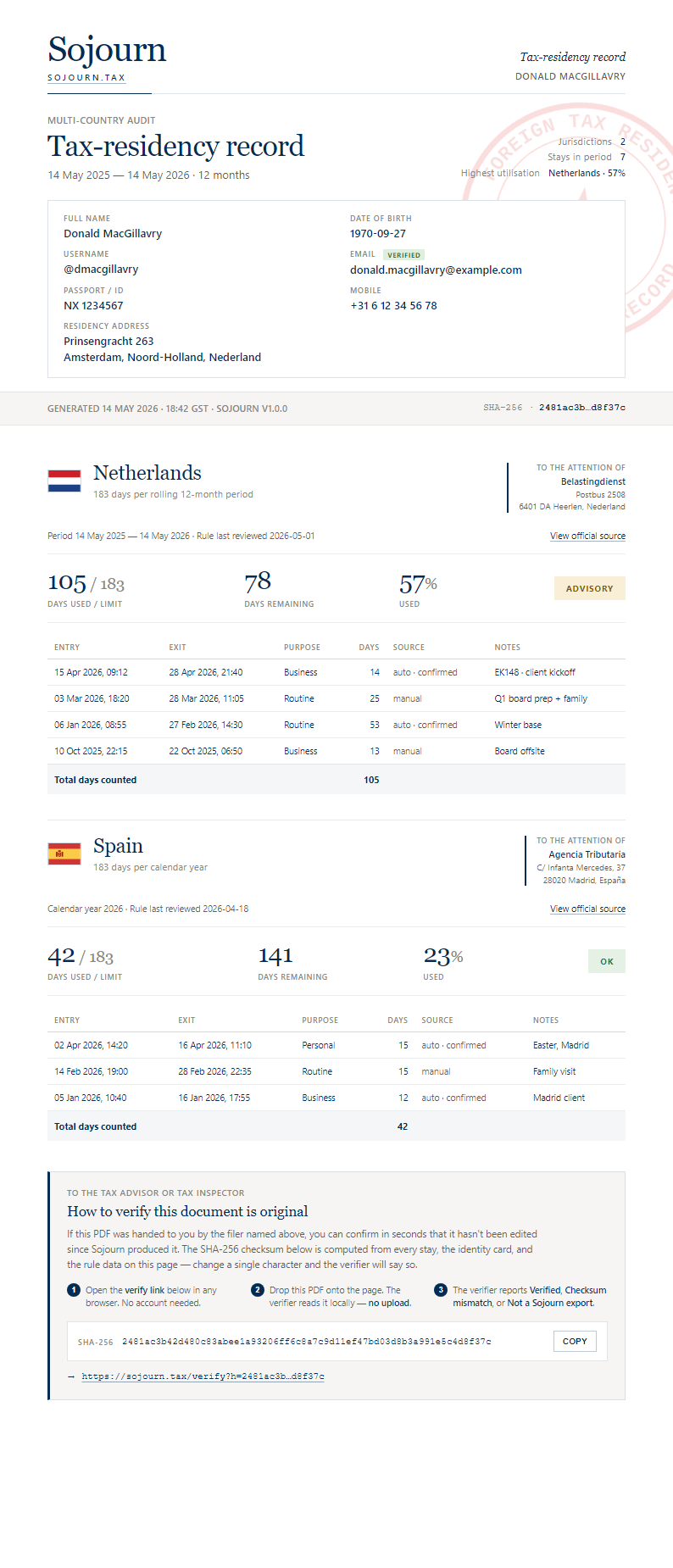
This is the document you hand to your tax advisor — or, in the worst case, to a tax authority. Below is an example of what an exported page looks like.
What's on every page
- Logo top-left — quick visual signal of the source
- Identity strip top-right — full name, date of birth, verified email
- "To the attention of:" block — the official tax authority's correspondence address for the country being reported on (e.g. Belastingdienst for the Netherlands, HMRC for the UK). Makes the document read like a formal letter addressed to the right authority.
- Country and rule heading — which jurisdiction and which day-counting rule applies
- Total counted — number of days, percentage of the limit used
- Stay table — every entry-exit pair with date, purpose, days counted, source (auto / manual / edited), and any user note
- Domicile factors — voter registration, primary residence, family, etc., with each factor marked yes / no / N/A
- Signature line + accuracy declaration
- Standing disclaimer — Sojourn is a record-keeping tool, not tax advice
- SHA-256 checksum in the footer — 64-character hex string that fingerprints the entire document
Tax inspector or advisor?
Verification is free, in two places:
- This web page. No account, no install. Drop a Sojourn PDF below and get a verdict in a couple of seconds. Bookmark
sojourn.tax/verify. - The Sojourn mobile app — Free tier. Install Sojourn from the App Store or Google Play, open Settings → Tools → Verify an export, pick a PDF from your phone. Same verdict, useful when you're handed a file on the go.
Drop us a line at help@sojourn.tax if your office regularly receives Sojourn records and you'd like a walkthrough.
How to verify a Sojourn export
Option A · In-page validator
Drop a Sojourn export PDF here. The validator runs entirely in your browser — the file is never uploaded to a server. We compute its SHA-256 hash, look for the Sojourn signature, and tell you whether it's well-formed.
—
This check confirms file integrity and Sojourn provenance. It does not certify that the underlying events are accurate — that responsibility is the user's, as stated on every page of the export.
Option B · What the footer checksum is
The 64-character SHA-256 in the footer is a fingerprint of the record — every stay, the identity, the rule, the period — computed before the PDF is written. It is not a hash of the raw file bytes, so running shasum on the PDF produces a different value and won't reproduce it. To check a document, use the validator above, or the free verifier built into the Sojourn app (Settings → Tools → Verify an export). If someone gave you the footer checksum separately, paste it into the box above to confirm this file carries the same one.
What verification proves
A matching checksum proves integrity: the bytes of the PDF you're holding are the bytes Sojourn generated on the date in the header.
It does not prove:
- That the underlying entry / exit events were correct (the user is responsible for accuracy — Sojourn says so on every page)
- That the country rule shown is current (rules change; the export shows when the rule was last reviewed)
- That a tax authority will accept the document — that's a decision tax authorities make, not Sojourn
If you have doubts about any specific Sojourn export, write to help@sojourn.tax with the checksum and we can confirm whether it was generated by our system.